Showing posts with label transfer whatsapp messages. Show all posts

Tuesday, March 18, 2014

Transfer WhatsApp History between iPhone and Android Phone

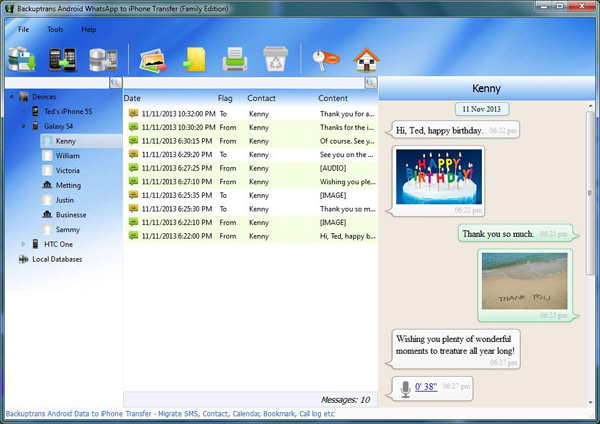
Got lots of WhatsApp Chat Messages on Android & iPhone and now want to share chat history between different devices(Android and iOS)? Backuptrans Android iPhone WhatsApp Transfer + must be the best WhatsApp migrating software which lets you transfer WhatsApp chat history with attachment between iPhone and Android Phone directly on computer. Just connect both your iPhone and Android to computer and click the "Transfer" button, and you will get it done in a few seconds. All WhatsApp Messages will be transferred and merged perfectly on new Phone.


Features:
1 Backup WhatsApp Chat History from Android/iPhone to PC
2 Restore WhatsApp Chat History from Computer to Android/iPhone
3 Transfer WhatsApp Messages between Android and iPhone
4 Recover WhatsApp Messages from iTunes Backup to Android/iPhone
5 Export WhatsApp Messages to document file(Txt, Csv, Doc, Html, PDF)
6 Print out WhatsApp Messages in conversations on PC
7 Extract WhatsApp pictures videos audios etc attachments on PC
8 Support iPhone, Samsung, HTC, Motorola, Sony Ericsson, LG, Huawei and More

Detail tutorial: How to transfer WhatsApp Messages between Android and iPhone?

Free download the program to try now.

Related:
 How to Transfer Data betweem Android and iPhone in Clicks?
 How to Transfer SMS Messages between Android and iPhone on Computer?



Friday, February 14, 2014

Transfer Android WhatsApp Messages to iPhone 5S/5C Easily

Just get a new iPhone 5S or iPhone 5C and now want to transfer Android WhatsApp Messages to iPhone 5S/5C? Backuptrans Android WhatsApp to iPhone Transfer must be a good choice which lets you transfer WhatsApp Messages from Android to iPhone 5S 5C in only a few clicks. All these WhatsApp Chat History will be merged perfectly on your iPhone 5S/5C. All popular Android phones such as Samsung Galaxy S2, Samsung Galaxy S3, Samsung Galaxy S4, Samsung Galaxy Note 2, Samsung Galaxy Note 3, HTC One, Motoroal Moto X, LG Nexus 5 etc are supported.


The following tutorial shows you how to transfer WhatsApp Chat History from Android to iPhone 5C/5S step by step.

What Video:


Free download the software on your computer to try.

If you are using Mac, please download Android WhatsApp to iPhone Transfer for Mac instead.

Best luck!

Related:
 How to Transfer Android WhatsApp Chat History to iPhone on Mac?
 How to transfer Android SMS messages to iPhone smoothly?
 How to Backup WhatsApp Chat History from iPhone to Computer?


Friday, February 7, 2014

Transfer WhatsApp Chat History from Android to iPhone Easily

Just got a new iPhone and now want to transfer WhatsApp Messages on your Android Phone to the new iPhone? Backuptrans Android WhatsApp to iPhone Transfer is a smart WhatsApp migrating program which lets you transfer WhatsApp Chat History from Android to iPhone easily on computer. All these WhatsApp Messages will be merged perfectly on your iPhone.  The following tutorial shows you how to transfer WhatsApp Messages from Android to iPhone step by step:


Step 1: Run Backuptrans Android WhatsApp to iPhone Transfer and connect your Android & iPhone to computer with USB cable.

Step 2: If a message pops out on your android phone’s screen, please click "Back up my data" button without entering password. Then back to the software on computer to click "OK" to continue.


Step 3: Click the Android in Devices list you want to transfer WhatsApp Messages from.

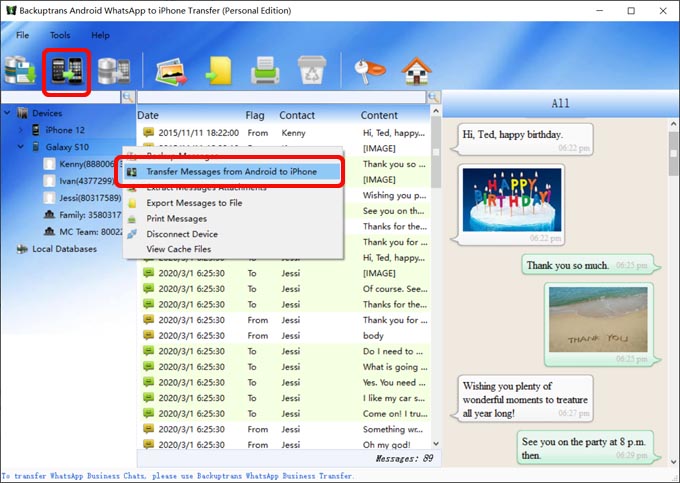
Step 4: Turn to top tool bar and press "Transfer Messages from Android to iPhone" button or go File -> Transfer Messages from Android to iPhone.


Step 5: Select a target iPhone that you want to transfer WhatsApp chat history to. Click Confirm to continue.

Done! Now you can see your Android WhatsApp conversation chats on iPhone.

Watch Video:


Free download Android WhatsApp to iPhone Transfer onto your computer and try.

If you are using Mac computer, please download Android WhatsApp to iPhone Transfer for Mac instead.

Best luck!

Related:
 How to Transfer Android WhatsApp Chat History to iPhone on Mac?
 How to transfer Android SMS messages to iPhone smoothly?
 How to Backup WhatsApp Chat History from iPhone to Computer?