The following tutorial shows you how to transfer WhatsApp Messages between Android Phones step by step:
Note: Before you run the software, please ensure your Android devices has USB debugging enabled.
Step 1: Run Backuptrans Android WhatsApp Transfer and connect your Android Phones to computer with USB cable.
Step 2: If a message pops out on your Android phone’s screen, please click "Back up my data" button without entering password. Then back to the software on computer to click "OK" to continue. Then the software will read all current WhatsApp Chat Messages from your Android Phones and show them on its main interface:
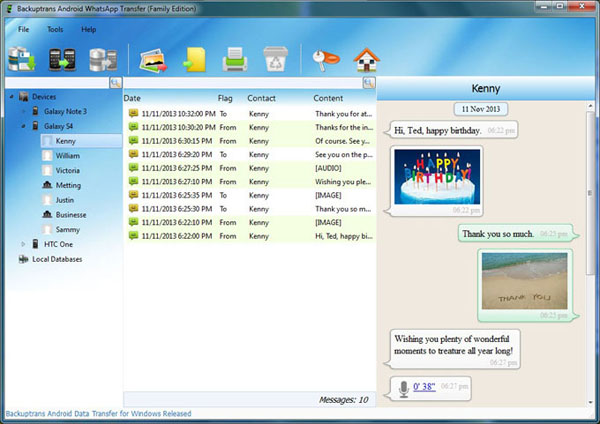
Step 3: Click the Android Phone in Devices list you want to transfer WhatsApp Messages from. Then turn to top toolbar and press "Transfer Messages from Android to Android" button.
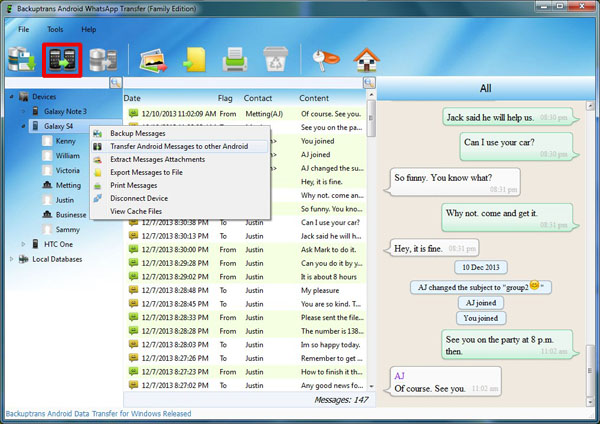
Step 4: Select an Android Phone that you want to transfer WhatsApp chat history to. Click Confirm to continue.
Transferred successfully. All your Whatsapp chat history have been transferred and merged on your new Android Phone. All popular Android phones such as Samsung Galaxy S2, Samsung Galaxy S3, Samsung Galaxy S4, Samsung Galaxy Note 2, Samsung Galaxy Note 3, HTC One, Motoroal Moto X, LG Nexus 5 etc are supported.
Free download Backuptrans Android WhatsApp Transfer to try.
Related:
 How to Backup WhatsApp Messages from Android to Computer? How to Restore WhatsApp Chat History to Android from Computer? How to Print WhatsApp Messages from Android on Computer? How to Decrypt & Read Chats from WhatsApp Backup File on Android? How to Transfer Data between Android Phones on Computer? How to Transfer WhatsApp Messages between Android and iPhone?