Showing posts with label iphone whatsapp to android. Show all posts

Friday, March 28, 2014

Extract WhatsApp History from iPhone Backup to Android

Lost your iPhone and now looking for a way to extract WhatsApp Chat History from iPhone backup to an Android Phone? As long as you have once backed up your iPhone with your iTunes on computer, Backuptrans iPhone WhatsApp to Android Transfer provides a good choice to transfer WhatsApp Messages from iTunes backup to Android phone directly even without your iPhone connected. All the WhatsApp Messages in iPhone backup will be transferred and merged perfectly on your Android Phone. No other WhatsApp transferring utility software can do this.


Tutorial shows you how to copy whatsapp messages from itunes backup to android step by step:


Step 1: Run Backuptrans iPhone WhatsApp to Android Transfer and connect your Android Phone to computer with USB cable.

Step 2: If a message pops out on your Android phone’s screen, please click "Back up my data" button without entering password. Then back to the software on computer to click "OK" to continue.Then software will read all WhatsApp chat messages from your Android Phone and show them on its main interface.

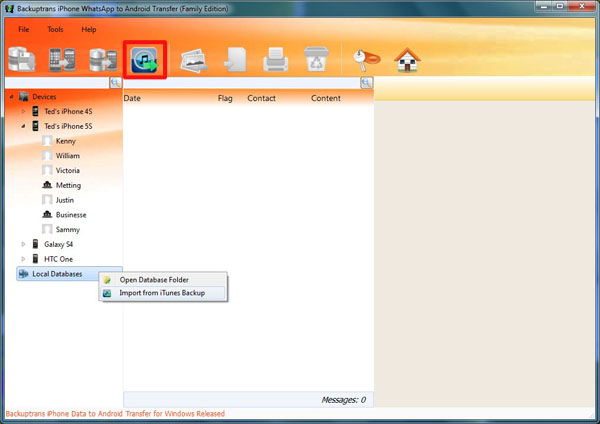
Step 3:Turn to top tool bar and press "Import from iTunes" button or go File -> Import from iTunes. Then the software will scan and detect all iTunes backup files on your computer automatically. Select your iPhone Backup on list and then click "Load" button to finish.

Step 4:Select a database to save chat messages. Or, simply enter a new database name to ceate a new database. Click Confirm to continue. Then you can view the WhatsApp chat Messages which have been imported from your iTunes Backup on Backuptrans software.
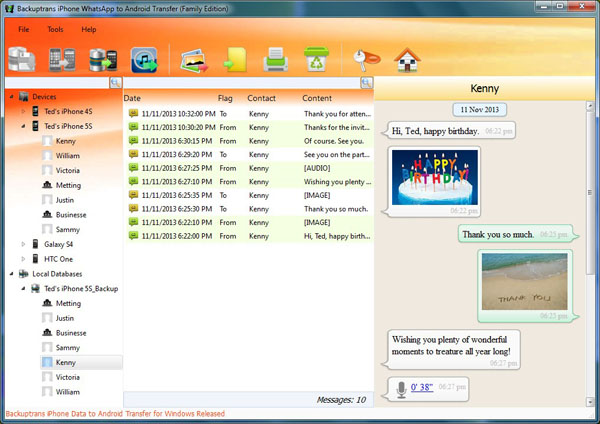


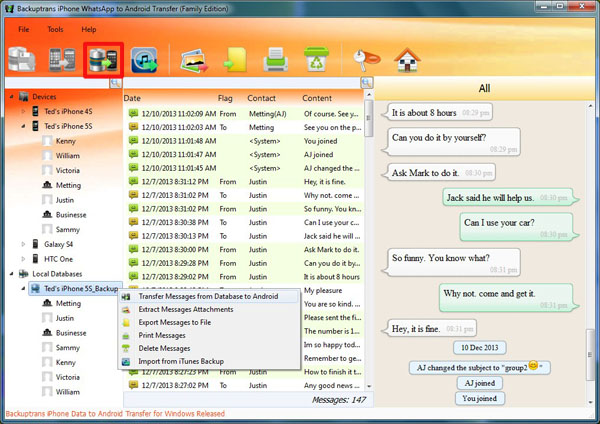
Step 5: Click the backup file in Local Database list. Turn to top toolbar and press "Transfer Messages from Database to Android" button or go File -> Transfer Messages from Database to Android.


Step 6: Select a target Android Phone that you want to transfer WhatsApp chat history to. Click Confirm to continue.


Done! All your WhatsApp Chat History in iPhone backup have been transferred to your Android Phone.

Free download Backuptrans iPhone WhatsApp to Android Transfer on your computer to try.

If you are using Mac, please download Backuptrans iPhone WhatsApp to Android Transfer for Mac instead.

Related:
 How to Transfer WhatsApp Messages from iPhone to Android?
 How to transfer SMS and MMS to Android from iTunes backup?
 How to Transfer Data from iPhone to Android Smoothly?
 How to Backup WhatsApp Messages from Android to Computer?
 How to Transfer WhatsApp Messages between Android and iPhone?


Friday, March 14, 2014

Transfer & Merge WhatsApp History from iPhone to Android

Got lots of WhatsApp Chat History on your iPhone and now want to transfer WhatsApp History from iPhone to Android Phone? Backuptrans iPhone WhatsApp to Android Transfer must be the best WhatsApp migrating software which lets you transfer WhatsApp Chat Messages with attachment files from iPhone to Android directly on computer. These iPhone WhatsApp Messages will be merged perfectly on Android Phone. No other WhatsApp transferring utility software can do this.


Simple tutorial shows you how to transfer WhatsApp Messages from iPhone to Android step by step:


Step 0: Before you run the software, please make sure you have installed iTunes 11.0 or above on your computer and your Android device has USB debugging enabled.

Step 1: Install the software on computer and run it Run Backuptrans iPhone WhatsApp to Android Transfer and connect your iPhone & Android Phone to computer with USB cable.

Step 2: If a message pops out on your Android phone’s screen, please click "Back up my data" button without entering password. Then back to the software on computer to click "OK" to continue.
Note: The software will backup WhatsApp data only from your Android phone.

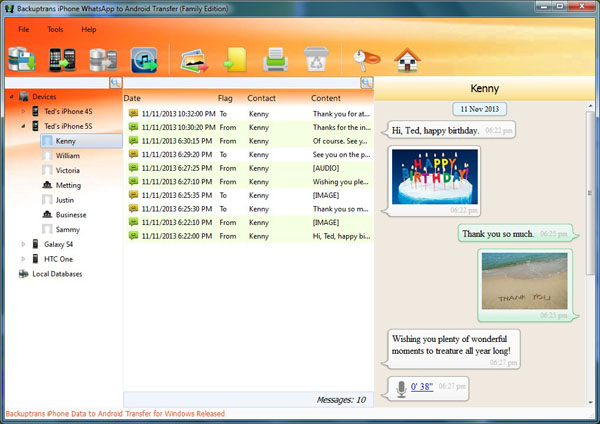
Step 3: View WhatsApp Chat History on software Now the software will read all WhatsApp chat messages from your iPhone & Android Phone and show them on its main interface:


Step 4:Click the iPhone in Devices list you want to transfer WhatsApp Chat History from.

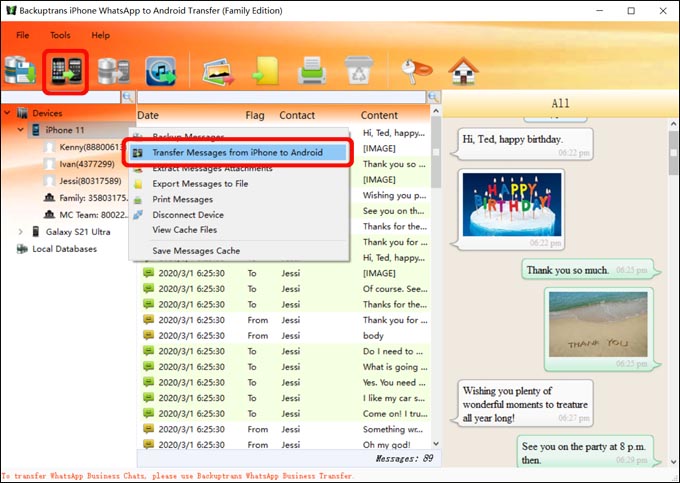
Step 5: Turn to top tool bar and press "Transfer Messages from iPhone to Android" button or go File -> Transfer Messages from iPhone to Android.
Tip: Or you can right click the Android in Devices list and then choose "Transfer Messages from iPhone to Android".


Step 5: Choose an Android Phone you want to transfer chats to Select a target Android Phone that you want to transfer WhatsApp chat history to. Click Confirm to continue.


Transferred successfully. All your iPhone Whatsapp chat history have been transferred and merged perfectly on your Android Phone.  You can even transfer chat conversations with a single contact from iPhone to Android.   Free download the software from your computer to try now.

Note: If you are using Mac, please use Backuptrans iPhone WhatsApp to Android Transfer for Mac.

Related:
 How to Copy WhatsApp Messages from iTunes Backup to Android?
 How to Transfer SMS and MMS from iPhone to Android?
 How to Transfer Data from iPhone to Android Smoothly?
 How to Transfer WhatsApp Messages between Android and iPhone?

 How to Backup WhatsApp Messages from Android to Computer?